How Davner works
Upload your records, confirm the request, and let Davner take care of the prior authorization.
Davner takes prior authorization work off your team’s plate. Upload the clinical records and confirm the request details. We take care of the submission and payer follow-up, and keep you up to date along the way.
Upload, review, and confirm
Start with the records you already have: the order or referral, insurance information, and supporting clinical documentation. You can upload PDFs, Word documents, and images, including screenshots.
Davner uses those files to fill out the prior authorization form. Check that the information is correct, make any changes, and confirm the request. Then it’s over to us.
Follow Your first prior authorization for a walkthrough.
We take care of the rest
We handle the phone calls, faxes, and portal submissions needed to get the request to the payer and follow it through review.
We’ll email you with updates. If we need more information from your practice, we’ll explain what’s needed so you can respond right on the request.
See what’s happening without chasing updates
You have full visibility into the work. Open a request to see its status, read updates and call transcripts, or view faxes we’ve sent and received. You can leave a comment whenever you have a question.
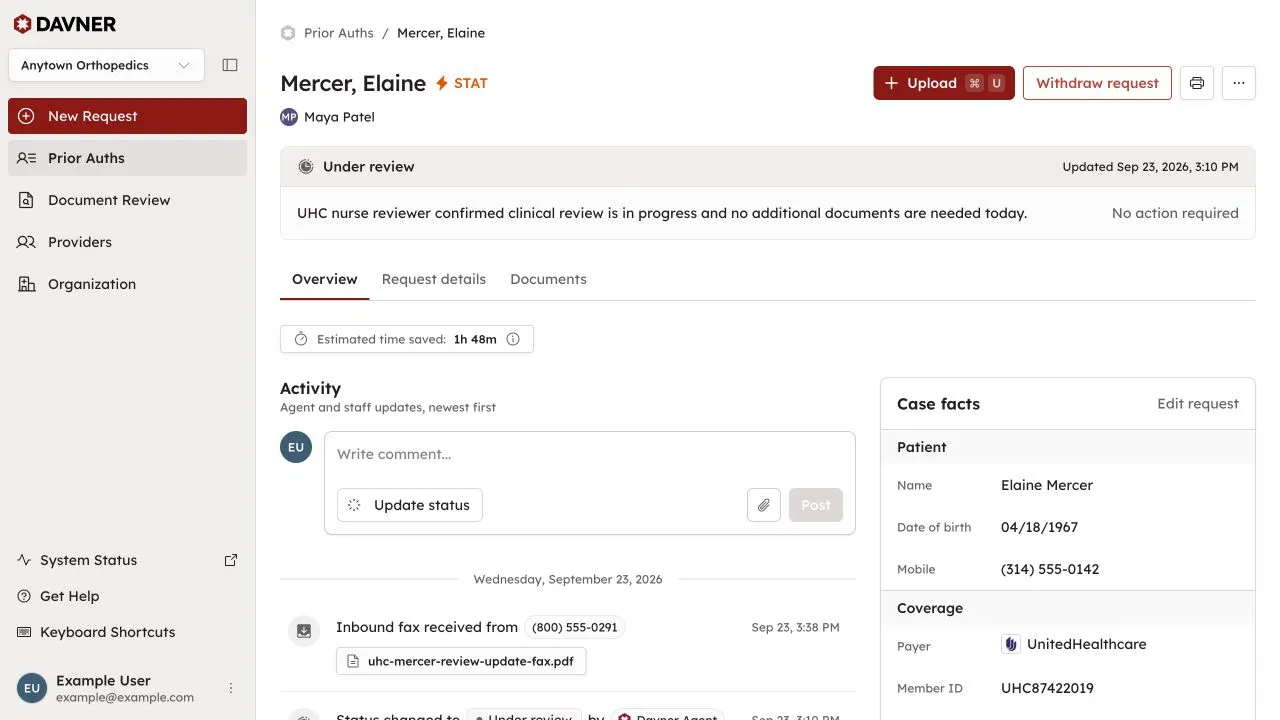
When the payer makes a decision, we’ll let you know and explain any next steps.
If you’re considering Davner for your practice, schedule a demo to see how it works.